GPT Image 2.6 Review: GIF, SVG, Cost and Who It's For
What's new in GPT Image 2.6, tested with our own GIF, three posters and a photo edit.

On this page
- What is GPT Image 2.6?
- How do you make a GIF with GPT Image 2.6?
- GIF settings and limits
- GIFs in ChatGPT
- Can GPT Image 2.6 make SVG files?
- What did our GPT Image 2.6 tests show?
- Posters: complexity low vs high
- Editing a product photo
- How much does GPT Image 2.6 cost?
- Who is GPT Image 2.6 for?
- Flare or Sunburst?
- When to stay on GPT Image 2.5
- How to use GPT Image 2.6
- In the OpenAI API
- In ChatGPT
- On OmniaKey
- What OpenAI has not said yet
- Frequently asked questions
- When was GPT Image 2.6 released?
- Can GPT Image 2.6 make GIFs?
- Can GPT Image 2.6 make SVG files?
- How much does GPT Image 2.6 cost?
- What is the difference between GPT Image 2.6 Flare and Sunburst?
- Is GPT Image 2.6 better than GPT Image 2.5?
- Sources checked
GPT Image 2.6 is OpenAI's newest image model, released November 4, 2026, as gpt-image-2.6-sunburst and gpt-image-2.6-flare. It adds animated GIF output, SVG output and a complexity setting, at the same per-token prices as GPT Image 2.5 (changelog and image generation guide, checked November 5, 2026). We made a GIF, three posters and a product-photo edit with it the next day.
Short answer
- New on both models: animated GIF output, SVG output and a complexity setting.
- Our GIF looped cleanly back to its first frame, all three posters spelled every word right, and the photo edit kept the scene while redrawing it.
- Token prices match 2.5, and a 1024x1024 image at medium quality now takes 1,449 output tokens instead of 439; our GIF used about $0.035 of tokens at OpenAI's list prices.
- It suits short loops, vector logos, text-heavy posters, careful edits (Sunburst) and quick drafts (Flare).
- Batch, the Responses API and Chat Completions are "Not supported" on both 2.6 model pages.
What is GPT Image 2.6?
OpenAI shipped both 2.6 models on November 4, 2026. The changelog entry for that day announces them "for image generation and editing, with adjustable complexity, SVG generation, and animated GIF generation" and carries the two model IDs plus the two image endpoints (changelog, checked November 5, 2026). Sunburst is the model for "detailed visual work" and Flare the one for "fast iteration" (Sunburst, Flare, checked November 5, 2026).
Both take POST /v1/images/generations and POST /v1/images/edits. The model pages mark Batch, Responses and Chat Completions "Not supported", while the 2.5 pages still list Batch and the Responses image tool (2.5 Sunburst, checked November 5, 2026). OpenAI Developers says the pair generates images "50% faster than before" (X post, November 4, 2026) without naming a baseline, and OpenAI's launch video adds one time figure, Flare at low quality in as little as six seconds (video, November 4, 2026). ChatGPT got its own release the same day, ChatGPT Images 2.6, which makes GIFs and keeps reference images of yourself, pets and characters ready to reuse (community announcement, November 4, 2026).
| GPT Image 2.6 | |
|---|---|
| Released | November 4, 2026 |
| Models | Sunburst, Flare |
| Endpoints | generations, edits |
| New output | Animated GIF, SVG |
| Complexity | low, medium, high |
| Image tokens | $8 in, $30 out per 1M |
| Batch | Not supported |
Three capabilities are new: animated GIF output, SVG output and the complexity setting, all tied to the 2.6 models in OpenAI's guide and changelog (checked November 5, 2026). Token rates match 2.5 at $8 per 1M image input tokens and $30 per 1M image output tokens, while OpenAI's calculator puts 2.6 at up to 4.2 times the output tokens of 2.5 for the same image; markup-guided edits work on both versions and bill like other edits. For the field-by-field version, see GPT Image 2.6 vs GPT Image 2.5.
How do you make a GIF with GPT Image 2.6?
Set output_format to gif in a POST /v1/images/generations request, pick frame_count and frame_duration_ms, then decode data[0].b64_json from base64 and save the bytes as a .gif file (image generation guide, checked November 5, 2026).
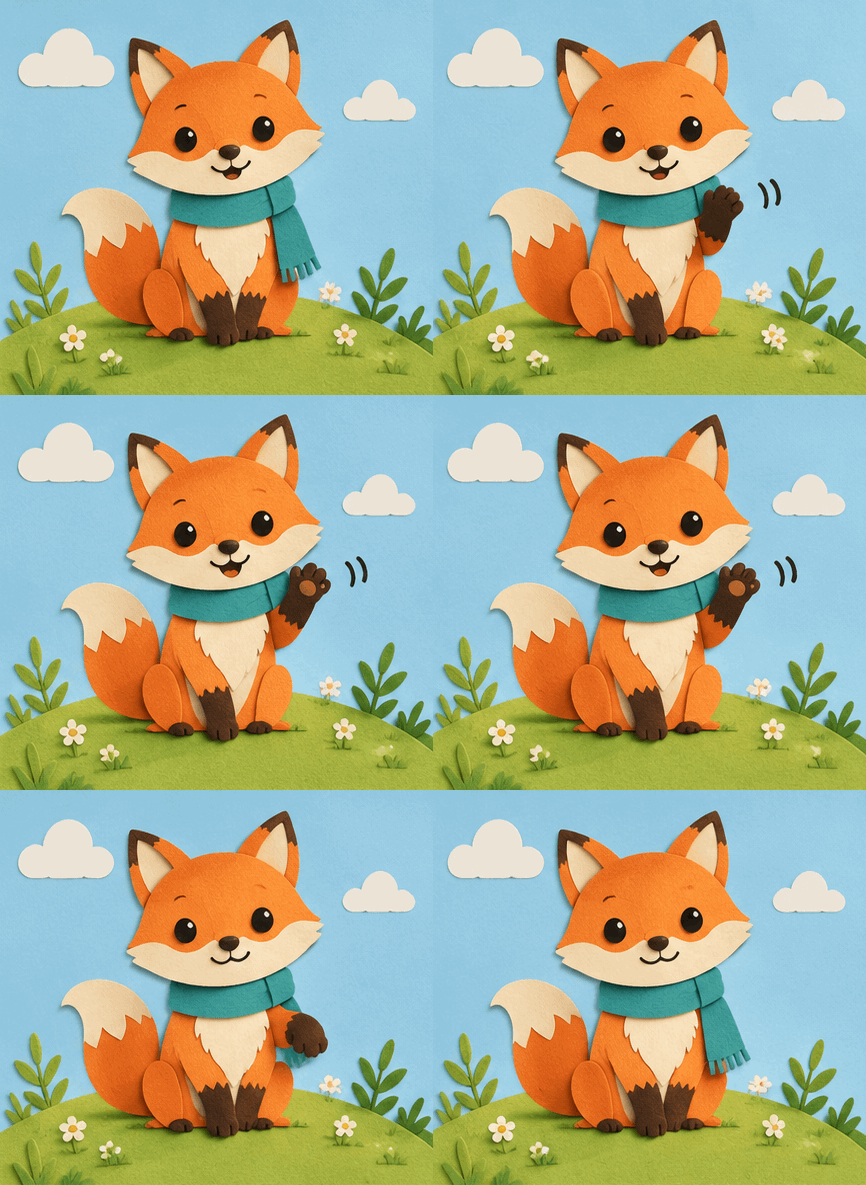
Here is the request we sent, one field per line:
{
  "model": "gpt-image-2.6-sunburst",
  "prompt": "A cheerful paper-cut fox with a teal scarf sits on a grassy hill, waves one paw, blinks, then lowers the paw back to its starting pose. Flat pastel sky, soft paper shadows, gentle motion, perfect loop.",
  "output_format": "gif",
  "frame_count": 9,
  "frame_duration_ms": 200,
  "size": "auto"
}
The response came back after 32.6 seconds, reported gif as the output format and carried one animation in data[0].b64_json. The saved file is 669,897 bytes, holds nine frames of 433 × 395 pixels and loops forever. Every frame in it is set to 180 ms rather than the 200 ms we asked for, so one loop lasts 1.62 seconds (9 × 180 ms) instead of 1.8 seconds; we saw that in this one file and have no explanation for it. The usage block lists 46 text input tokens and 1,147 image output tokens, which at OpenAI's list prices comes to 46 × $5 / 1,000,000 = $0.00023 for the prompt plus 1,147 × $30 / 1,000,000 = $0.03441 for the frames, about $0.035 in total.

The nine frames read as one fox waving: the paw rises from the sitting pose, the eyes close in a smile at the top of the wave, and the paw comes back down to the pose the loop started from, with the same hill, flowers and clouds in every frame.
GIF settings and limits
frame_counttakes 2 to 64 frames in the guide, while openai-python v3.46.0 lists 2 through 16 (commit, checked November 5, 2026); the default is 9 either way.frame_duration_mstakes 20 to 2000 milliseconds per frame, rounded to 10 ms, and defaults to 200.- A loop lasts frames × duration, so the default of 9 frames at 200 ms runs 1.8 seconds; OpenAI's own sample shows a monkey returning to its starting pose after 1.8 seconds.
sizedescribes each frame and takesautoor a width × height in multiples of 16; the frame count, the frame size and any extra animations must fit the model's size limits and the total pixel budget for the request.- GIF output runs on the generations endpoint only.
- Streaming, partial images, custom
output_compressionandprompt_rewriterare unavailable with GIF output. - OpenAI publishes no token figure for a GIF, so read
usagein the response to see what an animation consumed.
For a full curl request and a table of frame counts against loop length, see GPT Image 2.6 vs GPT Image 2.5.
GIFs in ChatGPT
OpenAI's community announcement (November 4, 2026) says ChatGPT Images 2.6 turns a prompt or an image into an animated GIF, then lets you adjust the speed and edit individual frames. The announcement does not name the plans that include GIFs.
Can GPT Image 2.6 make SVG files?
Yes, in the API: set output_format to "svg" and n to 1 on POST /v1/images/generations, then decode data[0].b64_json and save the UTF-8 XML bytes as a .svg file (image generation guide, checked November 5, 2026).
SVG output suits graphics you will edit as vectors later: icons, logos and illustrations built from paths, shapes and colors that a designer can restyle, resize or recolor. For SVG, the quality setting controls the reference image the API draws before the authoring step.
The returned document is static vector content, with no scripts, external resources or embedded raster images. The edit endpoint does not return SVG, and an SVG is not a supported input image for an edit; streaming, partial images, output_compression and prompt_rewriter are also unavailable.
Cost has two parts: the reference image at the image model's rate, then the tokens an authoring model spends writing the SVG, and OpenAI does not name that authoring model (guide, checked November 5, 2026). OpenAI's example runs one Field & Flour bakery logo prompt on both models, and Flare draws a golden loaf above a two-line cream wordmark while Sunburst draws a steaming loaf between wheat sprigs above the wordmark and a rolling pin.
We have not made an SVG with 2.6 yet, so everything above comes from OpenAI's guide.
What did our GPT Image 2.6 tests show?
We ran everything on November 5, 2026 through OmniaKey's API, one run per setting, with no retries and no picking the best of several. Only the GIF response carried token counts, so the rest of the results below are times and descriptions.
Posters: complexity low vs high
The complexity setting controls how much the model plans before it renders. Its values are low, medium and high, high applies when the field is left out, and it is separate from the quality setting, which controls rendering. OpenAI suggests lower settings for focused edits such as a background or a sign, and higher ones for dense text, complex layouts and the relationships between objects; higher can add latency and unwanted changes, and it carries no separate fee (guide, checked November 5, 2026).
The prompt:
A vintage screen-print travel poster for a fictional seaside town called Port Calder. A red-and-white lighthouse at sunset above a small harbor with three fishing boats. At the top, the headline PORT CALDER in bold capitals. Below it, the line Summer Ferry Festival · July 12–14. In the bottom right corner, a small inset map with three labeled stops: Old Pier, Lighthouse, Market Square. Limited palette of coral, navy, cream and teal, visible paper grain.
We sent it three times at once: Sunburst at low complexity (run A), Sunburst at high complexity (run B) and Flare at high complexity (run C), each at 1024x1536 and medium quality.


All three posters spelled the headline PORT CALDER, the line "Summer Ferry Festival · July 12–14" and the three map labels Old Pier, Lighthouse and Market Square right, letter for letter at full size.
- Run A puts a serif headline on a navy sky with the date line between two thin rules, a lighthouse with a white house on a rocky point, three boats at a stone pier, a lobster trap and a mooring post in the left foreground, gulls overhead, and a cream map box with labels on tags, a dotted line between the stops and a compass rose.
- Run B turns the sky coral, sets the date line in navy italic script, moves the lighthouse onto a green headland with a village across the water, brings the boats closer, and draws the map as an island with a small lighthouse, a few houses, a compass lettered N, E, S and W, a dotted line and two red dots at Market Square where the other two runs have one.
- Run C puts a navy band behind the headline, sets the date line under a thin rule, places the lighthouse on the right among houses, and gives its map a green coastline, a solid line and plain labels without tags.
The three came back in 25.3 s, 31.1 s and 25.3 s, all well inside the two minutes OpenAI says a complex prompt can take (guide, checked November 5, 2026). Our timing starts at the request and includes the network, so treat those numbers as ours rather than as a speed test.
One run per setting cannot show that complexity caused any of the differences between A and B; they may be chance. Our earlier Sunburst run of the same prompt garbled one small map label, printing "Market" above a scrambled second line where "Square" belonged, so zoom into the smallest type before a poster goes to print.
Editing a product photo
Flare made the photo at 1536x1024 from a prompt for a matte sage-green ceramic water bottle with a bamboo cap on a pale travertine block, a eucalyptus sprig beside it and soft window light from the left, in 26.2 seconds. Sunburst then edited it with one instruction, to change only the bottle's color to glossy terracotta orange and keep the cap, the block, the sprig, the lighting, the shadows and the camera angle the same, in 26.7 seconds.


The bottle came back glossy terracotta orange, and the bamboo cap, the travertine block with its pores, the eucalyptus sprig, the light from the left, the shadows and the camera angle all look the same. A pixel comparison shows more: the areas left and right of the bottle score 0.94 and 0.96 on a structural similarity check, where 1.0 means identical, so the rest of the picture was redrawn rather than copied. If the background has to stay pixel-identical, compare the result against the original before you replace it.
How much does GPT Image 2.6 cost?
OpenAI charges the same per-token rates as 2.5 (pricing page, checked November 5, 2026):
| Per 1M tokens | GPT Image 2.6 |
|---|---|
| Image input | $8 |
| Image output | $30 |
| Cached image input | $2 |
| Text input | $5 |
| Cached text input | $1.25 |
OpenAI's calculator turns those rates into a cost per image. These are its figures for a square image and a 1536-wide landscape image:
| Size | Quality | 2.5 tokens / cost | 2.6 tokens / cost |
|---|---|---|---|
| 1024x1024 | low | 196 / $0.006 | 823 / $0.025 |
| 1024x1024 | medium | 439 / $0.013 | 1,449 / $0.043 |
| 1024x1024 | high | 1,756 / $0.053 | 1,756 / $0.053 |
| 1536x1024 | low | 158 / $0.005 | 664 / $0.020 |
| 1536x1024 | medium | 343 / $0.010 | 1,132 / $0.034 |
| 1536x1024 | high | 1,372 / $0.041 | 1,372 / $0.041 |
Two patterns matter. At low quality 2.6 uses 4.2 times the output tokens of 2.5 for the same square image (823 against 196), and at medium 3.3 times, which lifts a medium 1024x1024 image from $0.013 to $0.043. At high quality the two models return identical counts, so a high-quality image costs the same on either.
Our GIF is the one animation we could price from a real response: 1,147 output tokens at $30 per 1M plus 46 input tokens at $5 per 1M came to about $0.035. SVG output bills the reference image at the image model's rate and the authoring model's tokens on top, and OpenAI leaves that authoring model unnamed. Complexity adds no separate fee, so a low run and a high run of the same prompt bill the same.
Batch halves the image rates for 2.5 only: the Batch table has no 2.6 row, and both 2.6 model pages mark Batch "Not supported" (checked November 5, 2026). OmniaKey's per-image rates for both models are on the Sunburst and Flare model pages.
Who is GPT Image 2.6 for?
- A short loop for a landing page or a social post: ask for GIF output and the whole animation arrives as one file.
- Logos and icons you will restyle later: SVG output hands a designer editable paths, shapes and colors.
- Text-heavy posters, menus and dense layouts: try the high complexity setting, then check the smallest type at full size.
- Detailed edits that must keep their details: Sunburst at medium or high quality, which OpenAI says holds details more consistent from one edit to the next.
- Fast first drafts of posters and product shots: Flare, which OpenAI's launch video suggests for a quick first pass.
Flare or Sunburst?
OpenAI's model pages put Sunburst on "detailed visual work" and Flare on "fast iteration", and its launch video suggests Flare for a quick first pass on a poster or a product shot and Sunburst at medium or high quality when details must survive edits (video, November 4, 2026). Both bill the same rates and take the same fields.
User reports are mixed. On Hacker News on launch day, jjcm wrote that after an hour they were "rolling back 2.6-flare to 2.5-flare" because its outputs came out "too simplistic" or "inherently broken in other cases", while "2.6-sunburst seems solid however" (comment, November 4, 2026). bsboxe posted that OpenAI's calculator shows a quadrupling of token use at low and medium quality (comment). bnmathm shared 1024x1024 timings of 6.7 s at low, 7.9 s at medium and 8.9 s at high for 2.6, against 12.0 s for 2.5 at medium (comment). Each of those is one person's report from one setup.
In our three poster runs, Sunburst and Flare both got every word right, so text did not separate them here.
When to stay on GPT Image 2.5
Three cases still point to 2.5: Batch jobs, because 2.5 lists v1/batch as supported at half the image rates while 2.6 has no Batch row; tight token budgets at low or medium quality, where 2.6 uses 4.2 and 3.3 times the output tokens for the same picture; and pipelines that already return what you need, which can keep calling 2.5 unchanged. The GPT Image 2.6 vs GPT Image 2.5 comparison works through every field.
How to use GPT Image 2.6
In the OpenAI API
gpt-image-2.6-sunburst and gpt-image-2.6-flare both take the generations endpoint for new pictures and the edits endpoint for changes; Batch, Responses and Chat Completions are "Not supported" (Sunburst, Flare, checked November 5, 2026). openai-python v3.46.0, published on November 5, 2026, is the release that adds the complexity setting and the GIF and SVG output controls to the SDK (commit, checked November 5, 2026).
In ChatGPT
ChatGPT Images 2.6 arrived the same day, and OpenAI's announcement says it makes a GIF from a prompt or an image, adjusts the speed, edits single frames and keeps reusable reference images of yourself, pets and characters (community post, November 4, 2026).
On OmniaKey
Both 2.6 models are on OmniaKey for generating and editing.
qualitytakeslow,mediumorhigh.- An edit takes an inline Base64 image, and the whole request is capped at 1 MiB.
- Several reference images go in
images.
curl --fail-with-body https://api.omniakey.com/v1/media/tasks \
  -H "Authorization: Bearer your-omniakey-api-key" \
  -H "Content-Type: application/json" \
  -H "Idempotency-Key: port-calder-poster-001" \
  -d '{
    "model": "gpt-image-2.6-sunburst",
    "type": "image",
    "operation": "generate",
    "input": {"prompt": "A vintage screen-print travel poster for a fictional seaside town called Port Calder, with the headline PORT CALDER at the top."},
    "parameters": {"size": "1024x1024", "quality": "medium"}
  }'
- The reply is
202with a task ID. - Poll
GET /v1/media/tasks/{id}until the status issucceeded. - Download the image from the signed URL in the task's
assets.
Swap the model to gpt-image-2.6-flare for Flare. Current rates are on the Sunburst and Flare model pages, every parameter is in the image API docs, and you can try both in the AI Image Generator.
What OpenAI has not said yet
- The baseline behind "50% faster": the X post and the launch video give no model, size or quality setting for the comparison itself, and the video's six-second figure covers Flare at low quality.
- The GIF pixel budget: the guide says frames, frame size and
nmust fit "the total request pixel budget" without giving the figure. - The SVG authoring model: the guide bills its tokens and leaves the model unnamed.
- The frame limit: the guide allows 2–64 frames and the openai-python commit says 2–16.
- A per-GIF token figure: none is published, so the response's usage block is the only source.
- Which ChatGPT plans include GIFs: the announcement names the feature and no plan.
Frequently asked questions
When was GPT Image 2.6 released?
November 4, 2026. OpenAI's changelog entry for that day announces gpt-image-2.6-sunburst and gpt-image-2.6-flare for generation and editing, and both model pages and pricing rows were live when we checked on November 5, 2026.
Can GPT Image 2.6 make GIFs?
Yes. Set output_format to gif on POST /v1/images/generations, choose frame_count and frame_duration_ms, then decode the animation and save the bytes with a .gif extension. The edits endpoint does not return GIF, and in ChatGPT you start from a prompt or an image instead.
Can GPT Image 2.6 make SVG files?
Yes. Set output_format to svg with n at 1 on POST /v1/images/generations, then decode data[0].b64_json and save the UTF-8 XML bytes as .svg. The result is static vector content, and the edits endpoint neither returns SVG nor accepts it as an input image.
How much does GPT Image 2.6 cost?
Per token, $8 per 1M image input tokens and $30 per 1M image output tokens, the same as 2.5. Per image, OpenAI's calculator gives 823 output tokens ($0.025) at 1024x1024 low, 1,449 ($0.043) at medium and 1,756 ($0.053) at high, and our own GIF used about $0.035 of tokens at OpenAI's list prices.
What is the difference between GPT Image 2.6 Flare and Sunburst?
Sunburst is OpenAI's model for "detailed visual work" and Flare its model for "fast iteration". They take the same endpoint fields and bill the same per-token rates, and OpenAI says Sunburst keeps details more consistent from one edit to the next at medium or high quality.
Is GPT Image 2.6 better than GPT Image 2.5?
It depends on the job. 2.6 adds GIF, SVG and complexity at the same token rates, and OpenAI claims 50% faster generation; but it uses 4.2 times the output tokens at low quality and 3.3 times at medium, so a picture costs more there, and Batch stays with 2.5. Our GPT Image 2.6 vs GPT Image 2.5 comparison sets the two side by side.
Sources checked
- OpenAI changelog
- GPT Image 2.6 Sunburst model page
- GPT Image 2.6 Flare model page
- GPT Image 2.5 Sunburst model page
- Pricing, image section
- Image generation guide
- openai-python v3.46.0 commit
- OpenAI Developer Community post
- OpenAI Developers post on X, November 4, 2026
- OpenAI launch video, November 4, 2026
- Hacker News comment by bnmathm
- Hacker News comment by bsboxe
- Hacker News comment by jjcm
Tested and checked November 5, 2026.
Models in this article

Related articles

GPT Image 2.6 vs GPT Image 2.5: What Changes?
OpenAI released GPT Image 2.6 on November 4: faster, with SVG and GIF output, but up to 4.2x the tokens of 2.5 per image.
GPT Image 2.5 API: Generate and Edit Images in Python
One POST creates the task and one GET reads it back. Here is the request code, the sizes we ran on October 29, 2026, and one edit shown before and after.

GPT Image 2.5 vs Nano Banana 2.1: Same-Prompt Test and Price
Four prompts, three image models, one day: what each made and what it really cost.